Template:S1 Pro with Sub1 or Sub2: Difference between revisions

From Bose Portable PA Encyclopedia
Jump to navigation Jump to search
mNo edit summary
mNo edit summary
 
(11 intermediate revisions by the same user not shown)
Line 1: Line 1:
{{T4S icon}}{{T8S icon}}{{S1 Pro icon}}{{Sub icon}}
=== Preferred Method ===
Connections with Sub1 or Sub2 and the {{S1 Pro}}


For best results, the signal flow should go from   
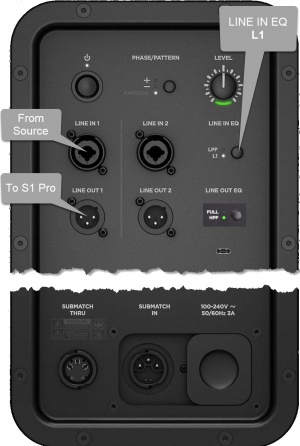
# [[File:Sub1 Sub2 io panel to S1 Pro.jpg|thumb|Sub io panel]]The signal source (e.g., {{ToneMatch Mixer}}, mixer, DJ console) output to  
# The Sub1 or Sub2 subwoofer LINE IN 1
# The Sub1 or Sub2 subwoofer LINE IN 1 ()
# The Sub1 or Sub2 subwoofer LINE OUT 1 to
# The {{S1 Pro}} with channel volume set to 10 o'clock.
;Note these settings on the Sub1 or Sub2
:👉 Set LINE IN EQ to '''L1'''
:👉 Set LINE OUT EQ to '''S1''' (Press and hold LINE OUT EQ button for 4 seconds)


Set up this way,  
Set up this way,  
Line 12: Line 19:
# The {{S1 Pro}} handles frequencies above 150 Hz


The picture shows a stereo setup, but illustrates the principles for mono.  The signal flow is from left to right.
;Mono - Example with a T4S as the audio source
* Start with the Volume on S1 Pro and Sub, as shown. Adjust as necessary from there.
 
[[File:T4S to Sub to S1 Pro.jpg|800px|T4S to Sub to S1 Pro]]
 
 
The picture shows a stereo setup.  The signal flow is from left to right.


[[File:S1 Pro with Sub.jpg|560px]]
[[File:S1 Pro with Sub.jpg|560px]]
Line 23: Line 36:
[[File:XLRFemale to 14trs.jpg|300px]]
[[File:XLRFemale to 14trs.jpg|300px]]


If you use an XLR to XLR cable, the signal will likely be too hot for the {{S1 Pro}}
If you use an XLR to XLR cable, the signal may be too hot for the {{S1 Pro}}.


<HTML><iframe width="560" height="315" src="https://www.youtube.com/embed/GZGRwhRXRNc?start=2659" title="YouTube video player" frameborder="0" allow="accelerometer; autoplay; clipboard-write; encrypted-media; gyroscope; picture-in-picture" allowfullscreen></iframe></html>


=== Alternative Connection ===
; Can I connect the S1 Pro Line Out to the Sub?
The method described above is preferred, but you can use the {{S1 Pro}} as the sound source (e.g., microphone and guitar and backing tracks via Bluetooth)  

Latest revision as of 12:37, 19 January 2022

<html>

<a href="/bose/wiki/index.php?title=T4S/T8S_ToneMatch%C2%AE_Mixer">T4S <img src="/bose/wiki/images/e/e9/T4S_icon.jpg" style="border:0px;height:35px;margin-left:3px;" alt="This information is applicable to the T4S ToneMatch® mixer " title="This information is applicable to the T4S ToneMatch® mixer"></a>

</html><html>

<a href="/bose/wiki/index.php?title=T4S/T8S_ToneMatch%C2%AE_Mixer">T8S <img src="/bose/wiki/images/9/99/T8S_icon.jpg" style="border:0px;height:35px;margin-left:3px;" alt="This information is applicable to the T8S ToneMatch® mixer " title="This information is applicable to the T8S ToneMatch® mixer"></a>

</html>

<html>

<a href="http://toonz.ca/bose/wiki/index.php?title=S1_Pro_system">S1 Pro  <img alt="This information is applicable to the S1 Pro system" src="S1_Pro_icon.png" style="45px;height:50px; float:right; border:0px;vertical-align:middle;" title="This information is applicable to the S1 Pro system"></a>
</html><html>

<a href="/bose/wiki/index.php?title=Sub1/Sub2">Sub1 Sub2 <img src="/bose/wiki/images/7/7f/L1_Pro_Sub1_Sub2_130x120.jpg" style="border:0px;height:35px;" alt="This information is applicable to the Sub1/Sub2" title="This information is applicable to the Sub1/Sub2"></a>

</html>

Preferred Method

Connections with Sub1 or Sub2 and the S1 Pro system

For best results, the signal flow should go from

  1. Sub io panel
    The signal source (e.g., ToneMatch Mixer<ref name="TM_Mixer">T4S ToneMatch mixer or T8S ToneMatch mixer or T1 ToneMatch Audio Engine</ref>, mixer, DJ console) output to
  2. The Sub1 or Sub2 subwoofer LINE IN 1 ()
  3. The Sub1 or Sub2 subwoofer LINE OUT 1 to
  4. The S1 Pro system with channel volume set to 10 o'clock.
Note these settings on the Sub1 or Sub2
👉 Set LINE IN EQ to L1
👉 Set LINE OUT EQ to S1 (Press and hold LINE OUT EQ button for 4 seconds)

Set up this way,

  1. The Sub1 or Sub2 handles frequencies from 40 Hz (Sub1) 37 Hz (Sub2) to 150 Hz
  2. The S1 Pro system handles frequencies above 150 Hz
Mono - Example with a T4S as the audio source
  • Start with the Volume on S1 Pro and Sub, as shown. Adjust as necessary from there.

T4S to Sub to S1 Pro


The picture shows a stereo setup. The signal flow is from left to right.

Recommended cable

Use an XLR to 1/4 inch (6.35 mm) Tip-Ring-Sleeve cable for best results.

If you use an XLR to XLR cable, the signal may be too hot for the S1 Pro system.

<HTML><iframe width="560" height="315" src="https://www.youtube.com/embed/GZGRwhRXRNc?start=2659" title="YouTube video player" frameborder="0" allow="accelerometer; autoplay; clipboard-write; encrypted-media; gyroscope; picture-in-picture" allowfullscreen></iframe></html>

Alternative Connection

Can I connect the S1 Pro Line Out to the Sub?

The method described above is preferred, but you can use the S1 Pro system as the sound source (e.g., microphone and guitar and backing tracks via Bluetooth) Note the following:

  1. The S1 Pro system will sound the same as without the subwoofer (62 Hz - 17 kHz)
  2. The Sub1 or Sub2 will cover from 40 Hz (Sub1) 37 Hz (Sub2) to 150 Hz
  3. You will be able to push S1 Pro system harder (louder) if you route the signal as described at the top of this article