Template:T4S/T8S Reverb Settings
Jump to navigation
Jump to search
Adding Reverb to a Channel
The Reverb function applies a user-adjustable amount of reverb to the selected channel. To select the type of reverb, see “Selecting a Reverb Type” below. Note: To mute the Reverb effects, press the Mix control. Press it again to unmute.

- Press or rotate the Menu control and select which output (Main of Aux) to send the reverb to.
- Rotate the Mix control to adjust the desired mix of dry signal (0%) to wet signal (100%).
- Rotate the Bright control to equalize the high frequencies of reverb applied to the selected channel
Setting Global Reverb Type
- Selecting a Reverb Type
The Reverb Type function allows you to select the type of reverb that is applied to all input channels. The decay time (Time) and balance (Bal) are adjustable. Balance controls the ratio of early-to-late reflections.
Note: To mute the Reverb, press the Type control. Press it again to unmute.
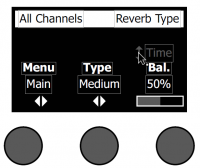
- Global Reverb Settings are different from the T1 ToneMatch Audio Engine.
|
|||||||||||||
| Menu | Main or Aux 1 (apply following settings to Main or Aux) | ||||||||||||
| Type | Plate, Small, Medium, Large, Cavern | ||||||||||||
| Time | Expressed as a percentage of the time range for each reverb type
|
||||||||||||
| Balance | Percentage (ratio of early/later reflections) | ||||||||||||
|
|||||||||||||