Mixer / Mackie / CFX Series
Mackie CFX Series
for Mk II Series see Mixer / Mackie / CFX MkII
Summary
Simplest thing that could possibly work.

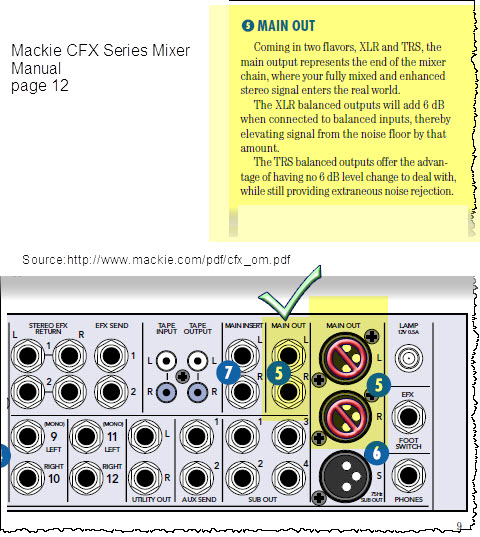
Use the ¼ inch phone jack (Tip-Sleeve) outputs to
- The PS1 Power Stand (Classic) / Model I Channels 1 or 2 if you want to use the Presets and the R1 Remote Tone and Level Controls
OR - The PS1 Power Stand (Classic) / Model I Channels 3 or 4 if you prefer to leave Channels 1 or 2 open for other inputs. You will have to control Tone and relative Level (between the Channels) at your input source, as you do not have this control over Channels 3 and 4 in the PS1 Power Stand (Classic) / Model I or the R1 Remote.
Outputs
XLR Balanced +4
The nominal output of the XLR Balanced Outputs is too high for the XLR inputs on the PS1 Power Stand Channels 1 and 2. If you want to use balanced cables from the Mixer to Channels 1/2 on the L1 Classic or L1 Model I you may need to use a Pad to lower the signal level from the mixer.
{{#Click:Pad|Image:Pad.jpg|Attenuation Pad}}
If you want to use balanced cables from the Mixer to Channels 1/2 on the L1 Classic or L1 Model I you may need to use a Pad to lower the signal level from the mixer.
{{#Click:Pad|Image:Pad.jpg|Attenuation Pad}}
¼ Inch with suitable output
for PS1 Powerstand Channel 1 or 2 inputs
You can use TS (Tip Sleeve) unbalanced cables, or TRS (Tip Ring Sleeve) balanced cables, but since the ¼ inch phone connections at the Bose Classic and Model I Power Stand are unbalanced there is no particular benefit using balanced cables.
¼ Inch Tip-Sleeve (unbalanced) to ¼ Inch Tip-Sleeve (unbalanced)

This should work fine.
¼ Inch Tip-Ring-Sleeve (balanced) to ¼ Inch Tip-Sleeve (unbalanced)

This should work fine.
¼ Inch Tip-Ring-Sleeve (balanced) to ¼ Inch Tip-Ring-Sleeve (balanced)

This should also work, but likely no better than a simple ¼ Inch Tip-Sleeve to Tip-Sleeve cable. This is because the ¼ Inch input on the Bose System is Tip-Sleeve (unbalanced) anyway.
Links: