T4S T8S Firmware Update Instructions
<iframe width="560" height="315" src="https://www.youtube.com/embed/ILWi5bhXJpQ" frameborder="0" allow="autoplay; encrypted-media" allowfullscreen></iframe>
</html>
For best results, please download and extract all files mentioned below to the same folder on your computer. This will make it easier to do the updates.
These instructions describe how to update the firmware of your ToneMatch® mixer.
- Download and install the LI System Updater tool at https://www.bose.com/en_us/l1_downloads.html
- Connect the mixer to your computer via the 2.0 USB Type-B port on the rear panel of your mixer.
See Figure 1.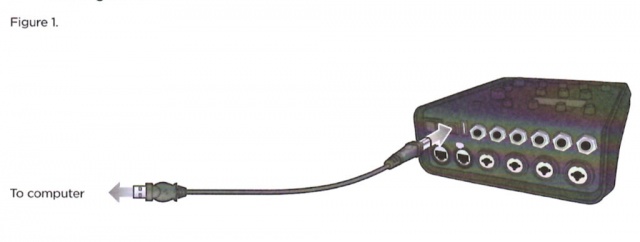
- Connect your mixer to a power source via a ToneMatch cable or power supply and turn on your mixer.
- To download the latest firmware, follow the appropriate link:
- http://bosepro.link/t4s
- http://bosepro.link/t8s
- Important
- move the *.bos files to the same folder as the L1 System Updater. This will make it easier to find the files when using the L1 System Updater.
- Launch the L1 System Updater.
- Click the "Update" button next to "T4S (or T8S) Firmware". See Figure 2.


- WARNING
- Do NOT unplug or power off the mixer while it is updating.
PDF version T4S T8S Firmware Update Instructions