Template:ToneMatch Mixer Backing Tracks
Usage
{{S1 Pro with External Device
|SourceDevice= an iPad, iPod, Tablet, Computer
|DeviceLink= Short form name of the device T4S or T8S
|Device= name of the device eg T4S ToneMatch mixer T8S ToneMatch mixer
|ImageAuxIn= image for Aux Inputs eg 
|ImageLastChannelsIn= image for Aux Inputs eg 
|discussion page = link to forum discussion (optional) e.g. discussion in the Bose Message Board
}}
Template will render as it appears below this line.
Analog Connections
Connect to the Aux Inputs to leave the combo jack inputs available. The Aux inputs are routed directly to the Main outputs. You can set Pan and Level using the Rotary Selector PAN/AUX settings
If you need to use Presets, Effects, or use physical volume controls, connect to the last two channels that have combo inputs.
Details about the Stereo to Mono Adapter
Connection: Stereo Mini (headphone or line-out source) to two Mono ¼ inch
Plug this into your MP3 Player/computer/minidisk/iPod (headphone or line out jack)
- (black end to MP3 Player) and
- coloured ends to
- PS1 Power Stand (Classic) / Model I Channels 1 and 2 OR Channels 3 and 4 OR
- T1 ToneMatch® Audio Engine Channel 4/5
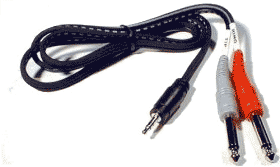
Source: Hosa CMP159
If you cannot locate a cable like the one above, you can accomplish the same thing with the combined cable and adaptors below.

and attach each coloured end to one of these,
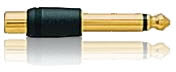
then connect to any of the ¼ inch inputs for L1 Model I or L1 Classic Channels 1/2/3/4. If you are using a T1 ToneMatch Audio Engine then you can use Channels 1,2,3 or 4/5.
If you are using the this kind of source as backing tracks, you will probably run these two connections to L1 Model I or L1 Classic Channels 3 and 4. In this case you will need to control volume and tone control from the sound source. You will not have much control through the L1 .
If you are using a T1 ToneMatch Audio Engine you will probably use Channel 4/5.
For details about the settings on the T1 ToneMatch® Audio Engine see:
T1 ToneMatch® Audio Engine / Gain Staging / Prerecorded music on Channel 4/5
iPad or iPod
If you connect your iPad or iPhone to a T1 ToneMatch® Audio Engine or T4S ToneMatch mixer channels 1, 2, 3 (or T8S ToneMatch mixer channels 1, 2, 3, 4, 5, 6, 7, 8) using a cable like this

You will hear only the LEFT side of the stereo signal. To hear both LEFT and RIGHT sides of the stereo signal, you must change the signal to MONO.
Set your iPad or iPhone to Mono
Launch the Settings app on your iPad or iPhone.
- Tap General.
- Tap Accessibility.
- In the Hearing section, turn Mono Audio On
Now both sides of the stereo output will have a mono signal (both Left and Right channels combined).
You can use a cable like this.
You can connect the stereo output to a mono unbalanced input like T1 ToneMatch Audio Engine channels 1,2,3.

This does not apply to T1 ToneMatch® Audio Engine channel 4/5. The channel 4/5 inputs are balanced mono and not compatible with a stereo signal that has been mixed down to mono from the iPad or iPhone
Connecting via USB
Please see: T1 ToneMatch® Audio Engine / USB