ToneMatch Mixer to Mackie SRM Loudspeaker
Connect a ToneMatch mixer to a Mackie SRM series loudspeaker
Overview
Here is an excerpt from the Mackie SRM 350 Owners Manual.

You can connect using XLR or 1/4 inch (6.3mm) Tip-Ring-Sleeve cables, whichever is most convenient. There is no advantage to using one over the other.
1/4 inch (6.3mm) Tip-Ring-Sleeve cable connections
This applies to both T4S and T8S Tonematch mixers.

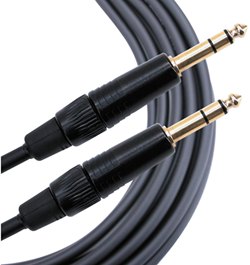
The output side is 1/4 inch (6.3 mm) Tip-Ring-Sleeve jack and the input on the Bose side is 1/4 inch (6.3 mm) Tip-Ring-Sleeve jack. Use a cable like this.
 .
.
1/4" TRS Balanced Patch Cable (audiopile.net)
XLR cable connections
This applies to only the T8S Tonematch mixer.

XLR cables provide a balanced connection. These are often used for microphones but they are also fine for line level connections.
