T4S to F1 Model 812 Tip Ring Sleeve Connection
Jump to navigation
Jump to search
Connect the T4S to F1 Model 812 Flexible Array Loudspeaker
Connect a ToneMatch Power Supply to the ToneMatch port on the T4S. Then

The output from the T4S ToneMatch mixer is a balanced mono 1/4 inch (6.3 mm) Tip-Ring-Sleeve and the input on the F1 Model 812 Flexible Array Loudspeaker is a balanced mono 1/4 inch (6.3 mm) Tip-Ring-Sleeve so use a cable like this.
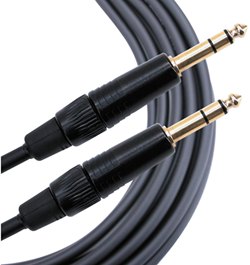 .
.
1/4" TRS Balanced Patch Cable (audiopile.net)
Connect the ToneMatch Power Supply to the T4S ToneMatch mixer for power.
Note: If you have only one F1 Model 812 Flexible Array Loudspeaker use the T4S output marked Right/Mono.
Gain Staging
For each F1 Model 812 Flexible Array Loudspeaker
F1 Model 812 Flexible Array Loudspeaker Channel 1 Combo Input
The use a ¼ inch Tip-Ring-Sleeve jack cable.
MIC / LINE LEVEL
Set this to LINE LEVEL
Volume Control
Use the Input 1 volume control.

- Set the Input 1 Volume control to the 0 (zero) position.
- Connect the T4S ToneMatch mixer Main Output to the Input 1
- Adjust the volume of the T4S ToneMatch mixer Main Output to the maximum output without distortion. This is probably between 10:00 o'clock and 12:00 o'clock on the Master Output
- While playing music through the T4S ToneMatch mixer, increase the Volume level so that the Signal/Clip indicator glows green with flickers of red. This will probably be around 9:00-11:00 o'clock
- If the Signal/Clip indicator glows red, decrease the Volume level so that it glows only green or red. If you see red flashes longer than one second, turn down the volume.