T4S Connection to L1 Model I: Difference between revisions
mNo edit summary |
mNo edit summary |
||
| (2 intermediate revisions by the same user not shown) | |||
| Line 24: | Line 24: | ||
=== {{T4S}} to two {{Classic}}/{{Model I}} systems === | === {{T4S}} to two {{Classic}}/{{Model I}} systems === | ||
To run a {{T4S}} with two {{Model I}} or {{Classic}} | |||
On the {{T4S}} Pan your inputs left and right as required, but for best results, pan your inputs to one side or the other, but not up the middle | |||
*{{T4S}} Left output to the Left {{Classic}}/{{Model I}} Channel 3<br>try setting the level to about 4 | |||
*{{T4S}} Right output to the Right {{Classic}}/{{Model I}} Channel 3<br>try setting the level to about 4 | |||
[[File:T4S to two L1 Classic Model I.jpg]] | [[File:T4S to two L1 Classic Model I.jpg]] | ||
Latest revision as of 18:39, 30 January 2020

Introduction
You can connect the T4S ToneMatch mixer to the L1 Classic or L1 Model I, just as you would a T1 ToneMatch Audio Engine. You'll need a ToneMatch Power Supply
T4S ToneMatch mixer to one L1 Classic/L1 Model I system
There's a slight difference because there are two 1/4 inch (6.3 mm) output jacks on the T4S for Left and Right Outputs.
You've got two ways to handle this:
- Pan all your inputs to one side (e.g. Right) and connect the T4S Right output to the L1® Classic Channel 3 (try setting the level to about 4)
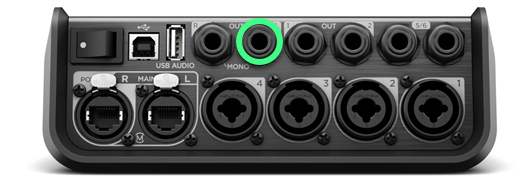
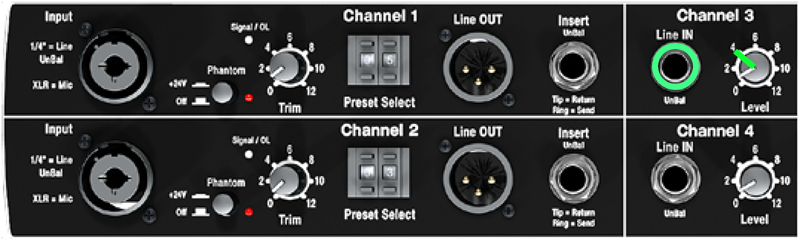
OR - Leave your inputs panned to center (the default setting), and connect
- T4S Left output to the L1 Classic/L1 Model I Channel 3
try setting the level to about 4 - T4S Right output to the L1 Classic/L1 Model I Channel 4
try setting the level to about 4
- T4S Left output to the L1 Classic/L1 Model I Channel 3


When using a T1 ToneMatch Audio Engine or T4S ToneMatch mixer with the L1® Classic, you don't need to use the R1 Remote.
T4S ToneMatch mixer to two L1 Classic/L1 Model I systems
To run a T4S ToneMatch mixer with two L1 Model I or L1 Classic
On the T4S ToneMatch mixer Pan your inputs left and right as required, but for best results, pan your inputs to one side or the other, but not up the middle
- T4S ToneMatch mixer Left output to the Left L1 Classic/L1 Model I Channel 3
try setting the level to about 4 - T4S ToneMatch mixer Right output to the Right L1 Classic/L1 Model I Channel 3
try setting the level to about 4

When using a T1 ToneMatch Audio Engine or T4S ToneMatch mixer with the L1® Classic, you don't need to use the R1 Remote.