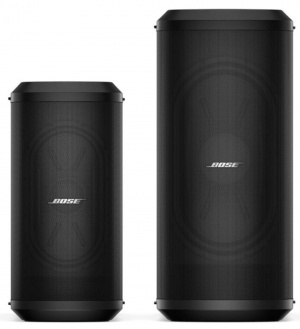
Unique RaceTrack woofers integrated in the Bose Sub1 and Sub2 modular subwoofers deliver powerful bass, have an optimized center of gravity, and save a lot of space. This slim design means you get the full impact of a conventional subwoofer without the cumbersome size, freeing up room in your vehicle and on the stage, and making every carry in between — home to car, vehicle to venue — much easier. [1]
Although the comparisons are approximate and this assumes that other variables like input power are similar:
The 7"x13" RaceTrack woofer in the Sub1 is comparable to 12" round driver.
The 10"x18" RaceTrack woofer is comparable to a 15" round driver.
Note: Both the Sub1 and L1 Pro8 use a 7"x13" RaceTrack woofer.
The L1 Pro8 is rated at 240 watts RMS to the subwoofer. The Sub1 is rated at 480 watts RMS.
Cardioid Mode
Cardioid Mode
Stack two Sub1 or Sub2 subwoofers in Cardioid Mode for focused, directional performance with reduced rear-firing bass energy (-10 dB SPL). This steers the bass out front, and reduces feedback. This is particularly useful when you have resonant instruments on the stage (e.g., kick drum, upright bass).
Note: Bose does not claim Cardioid mode increases the Sound Pressure Level (SPL) in front of the subwoofers. The main benefit is that it reduces the SPL behind the subwoofers.
See the tutorial in the video below starting at 4:05.
Why have a LEVEL control on the Bose Sub1/Sub2? This can also apply to other subwoofers as well.
Answer
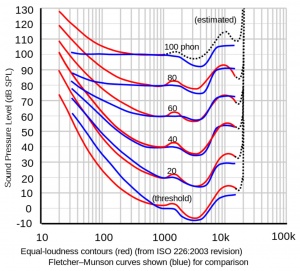
At lower volume, the Equal Loudness contour[2] shows that humans don't perceive bass as well as mid-highs. You can compensate for this by turning up the Sub1/Sub2 LEVEL Control.
Other times bass may seem excessive
At higher volumes
Due to boundary effects (proximity to walls and corners)
On a resonant stage
You can compensate for this by turning down the Sub1/Sub2 LEVEL Control.
Recommended Settings
Set the Sub1/Sub2 Level control at 12:00 o'clock[3].
Raise/lower the volume of the L1 Pro32 as required.
Adjust the Sub1/Sub2 Level control to balance bass level with the mid-high level from the L1 Pro 32.
You can use a Sub1 and Sub2 together. The connection will be L1 Pro32 to Sub2 to Sub1
You can stack them or place them side by side. In any arrangement where the grilles fit completely within a 30-inch (75 cm) diameter sphere, your two Subs will act like a single one, only louder. Note: Placing the Subs on either side of the L1 Pro32 power stand does not meet this criteria.
There are two options. Either is fine. Choose the one you prefer.
Option 1
Same crossover frequency applied to both Sub1 and Sub2 (200—37Hz)
Connect the L1 Pro32 to the Sub2 (use the supplied SubMatch cable)
Connect the Sub2 to the Sub1 use a SubMatch cable (purchased separately) OR
Connect the Sub2 Line Out to the Sub1 with an XLR cable and power the Sub1 with the supplied IEC power cable.
On the Sub2 set the Line Out EQ to Full (Full Range)
Level - set to 12:00 o'clock on both. If adjustments are necessary - keep the Level Control the same on both Subs
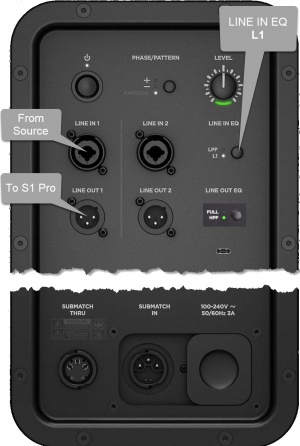
Start with the Volume on S1 Pro and Sub, as shown. Adjust as necessary from there.
The picture shows a stereo setup. The signal flow is from left to right.
Recommended cable
Use an XLR to 1/4 inch (6.35 mm) Tip-Ring-Sleeve cable for best results.
If you use an XLR to XLR cable, the signal may be too hot for the S1 Pro system.
Alternative Connection
Can I connect the S1 Pro Line Out to the Sub?
The method described above is preferred, but you can use the S1 Pro system as the sound source (e.g., microphone and guitar and backing tracks via Bluetooth)
Note the following:
The S1 Pro system will sound the same as without the subwoofer (62 Hz - 17 kHz)
The Sub1 or Sub2 will cover from 40 Hz (Sub1) 37 Hz (Sub2) to 150 Hz
You will be able to push S1 Pro system harder (louder) if you route the signal as described at the top of this article
Sub1 and Sub2 have extruded aluminum heat sinks mounted to the backside of the I/O panel. This pulls heat out of the electronics and transfers some to the air moving through the acoustic volume of the sub and helps to cool.[5]